
Gateway
Forward live tag data from any connected device to external systems — MQTT brokers, Azure IoT Hub, Amazon AWS IoT Core, SQL databases, and REST APIs — regardless of the source protocol.
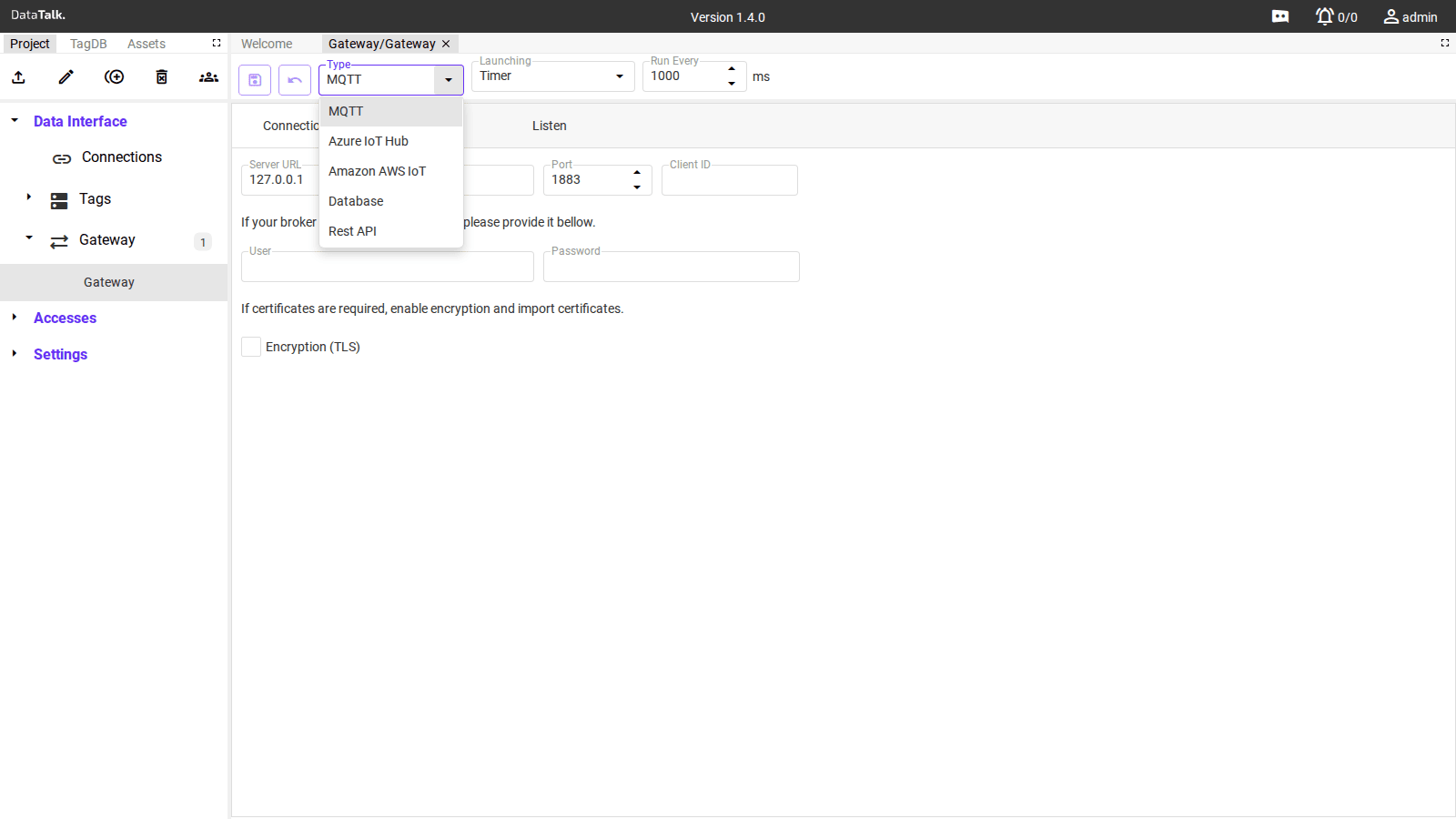
The Gateway is DataTalk’s outbound data forwarding engine. Once the gateway has read values from industrial devices via Connections — whether Modbus, EtherNet/IP, OPC UA, or any other protocol — it can push those values onwards to external systems over five different target types.
This is the key architectural capability: protocol translation and data aggregation in one place. A Modbus temperature sensor, an Allen-Bradley PLC tag, and an OPC UA flow meter can all be forwarded together to the same Azure IoT Hub endpoint, normalized into a single stream, without any additional middleware.
Key Features
Protocol-Agnostic Data Integration — Supports combining data from multiple communication protocols (EtherNet/IP, MQTT, REST API, and more) — useful in environments where different devices operate in parallel.
Unified Data Output — Transforms and publishes tag values into a standardized format, regardless of their source protocol. Supported targets: Amazon Web Services (AWS), Microsoft Azure, SQL databases (PostgreSQL, MSSQL), REST API, MQTT.
Trigger-Based or Periodic Publishing — Send data at regular intervals (every minute, every hour) or push based on specific events — such as a tag value change when a machine shifts from idle to running.
Example Use Case
Imagine a production line using:
- A PLC with EtherNet/IP
- An MQTT-enabled sensor
- Data fetched via REST API
With the Gateway, you unify all variables from these sources and send them in a single format to your cloud analytics system — making cross-platform integration and centralized analysis straightforward.
Common settings
Every gateway configuration shares the same top-level controls regardless of type:
Type — The target system to forward data to. Changing the type updates the connection fields below. Available types: MQTT, Azure IoT Hub, Amazon AWS IoT, Database, Rest API.
Launching — When the gateway sends data:
- Timer — sends at a regular time interval defined by Run Every (in milliseconds). Use for regular telemetry — e.g., every 1000 ms pushes all tag values once per second.
- Scheduler — sends at a specific time (e.g., every day at midnight).
- Tag Trigger — sends when a specific tag reaches a defined value. Example: when a machine status tag changes to “1” (start), data is sent.
- Tag Value Change — sends any time the value of a selected tag changes, regardless of the new value.
- On Change — sends whenever any monitored tag value changes.
Run Every — Polling interval in milliseconds (Timer mode only). 1000 ms = 1 second, 60000 ms = 1 minute.
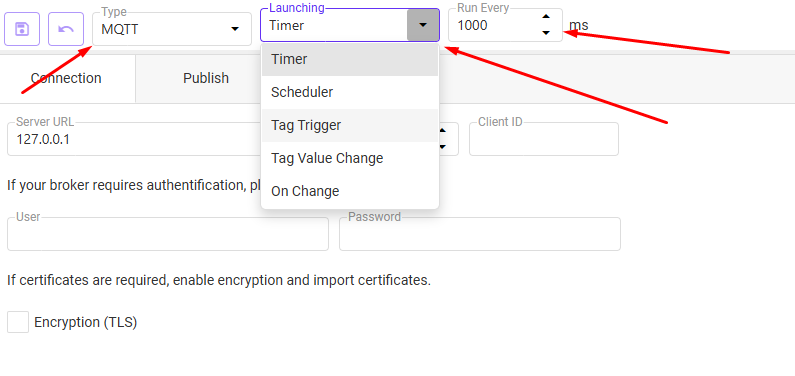
Each gateway instance forwards data to exactly one target service. If you need to send data to multiple platforms simultaneously (for example, both Azure IoT Hub and a SQL database), create a separate gateway for each target.
Assigning tags to a gateway
After creating a gateway, assign tags to it in the Tag Database. Select the tag(s) you wish to publish, then in the Gateway column check the box to open a list of available gateways. A single tag can be assigned to multiple gateways simultaneously — for example, publishing its value to both Amazon AWS and a custom REST API endpoint.
Gateway types
MQTT
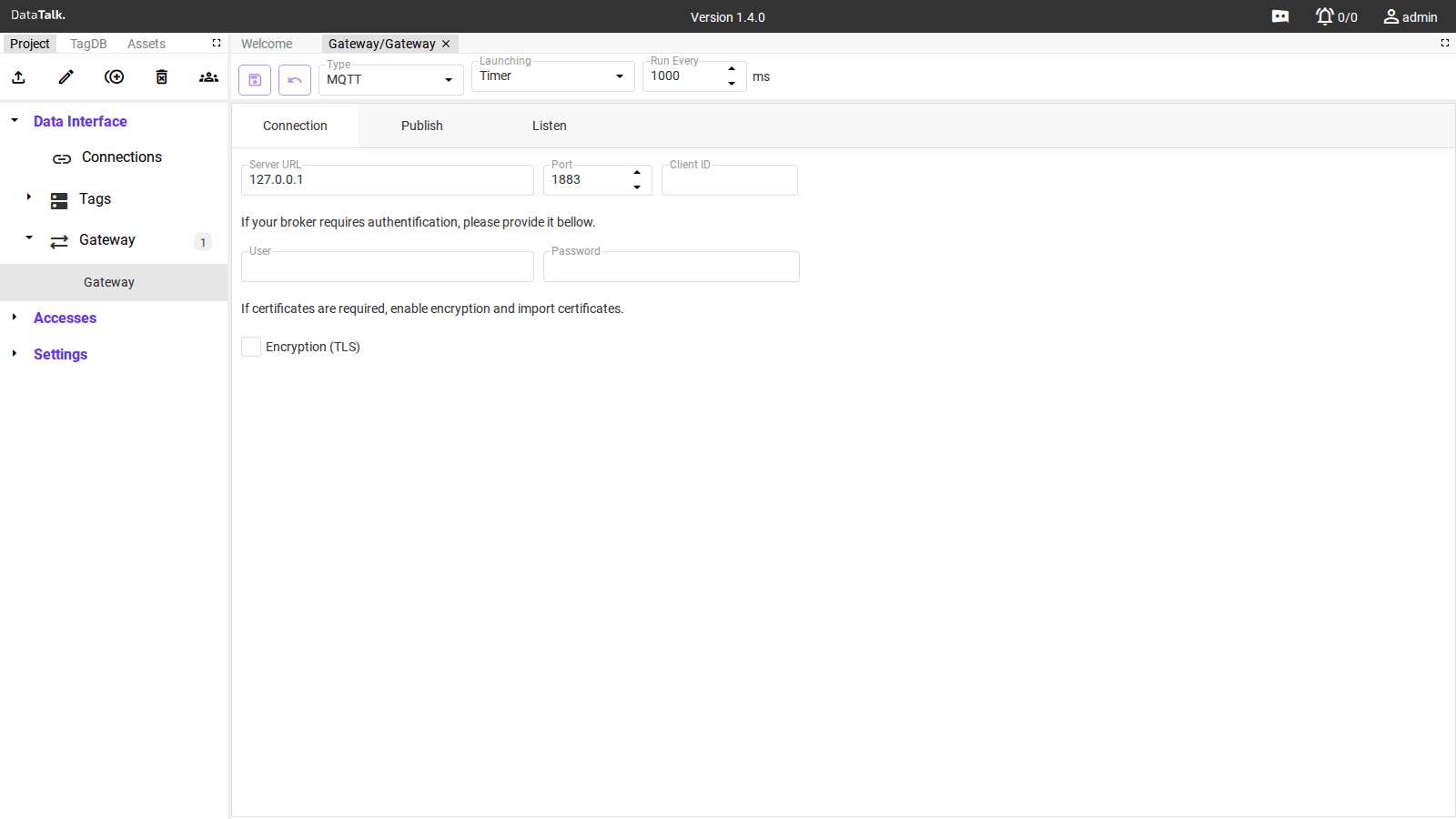
Forwards tag data to any external MQTT broker. The gateway acts as an MQTT client that connects to a broker you control — this is the outbound direction, distinct from the built-in MQTT Broker under Settings which makes the gateway itself into a broker.
Use this type to push data to:
- Self-hosted brokers (Mosquitto, HiveMQ, EMQ X)
- Cloud MQTT services (AWS IoT Core via MQTT, HiveMQ Cloud)
- Any MQTT-compatible IoT platform
Connection tab fields:
Server URL — IP address or hostname of the target MQTT broker (e.g., broker.example.com or 192.168.1.10).
Port — Broker port. Default 1883 for plain MQTT, 8883 for MQTT over TLS.
Client ID — Optional identifier this gateway uses when connecting. If left empty, a unique ID is generated automatically.
User / Password — Credentials if the broker requires authentication.
Encryption (TLS) — Enable to connect over TLS. When enabled, import the required certificates. Required for MQTT over port 8883 and for cloud broker endpoints.
Publish tab: Configure the MQTT topic to publish to and optionally transform data before publishing.
Listen tab: Subscribe to topics on the same broker to receive data back into the gateway — useful for bidirectional integrations where a cloud platform sends commands back to the gateway.
Azure IoT Hub
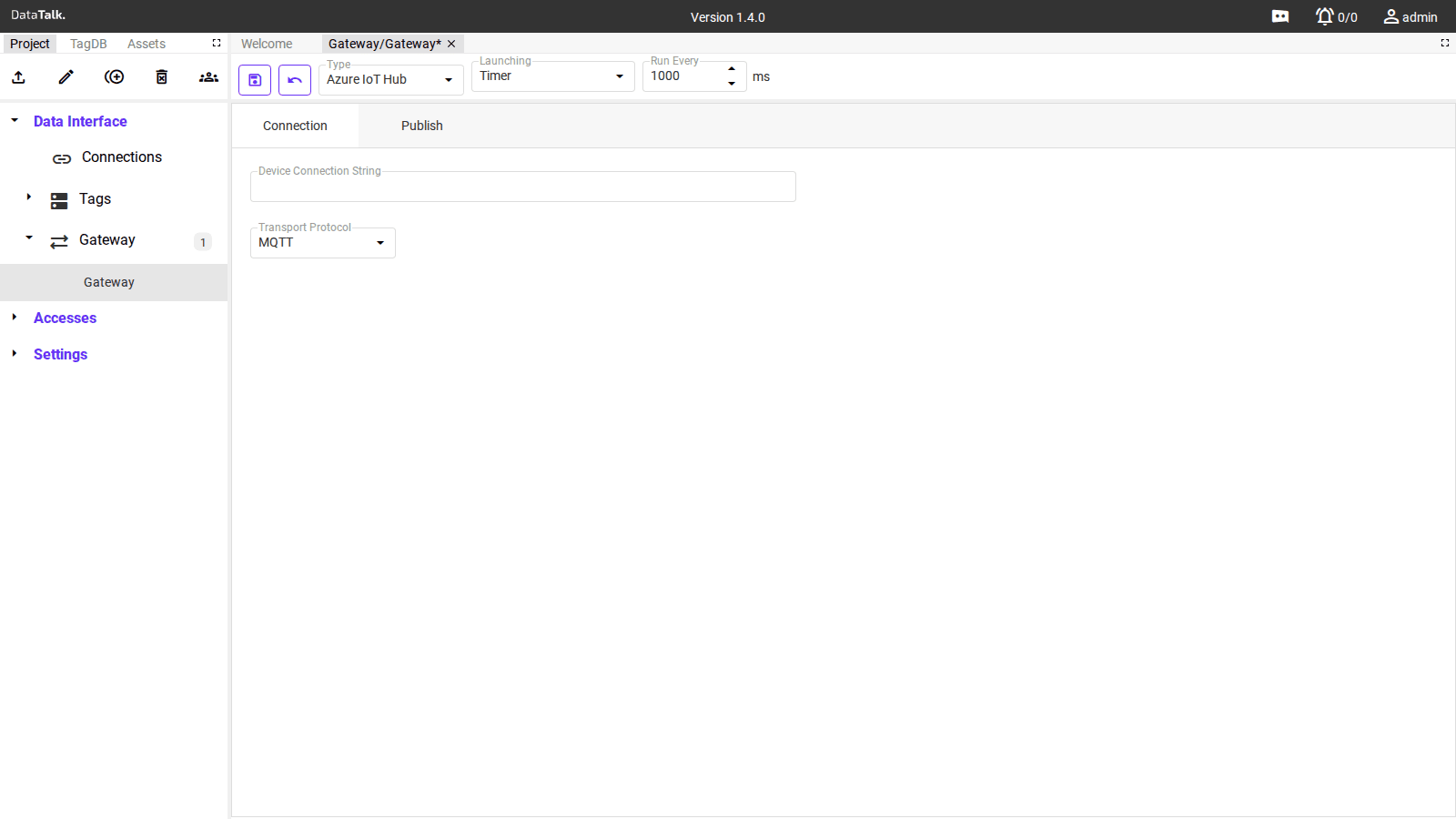
Forwards tag data directly to Microsoft Azure IoT Hub without any intermediate broker or custom code. The gateway authenticates as a registered IoT device using the Azure Device Connection String.
Connection tab fields:
Device Connection String — Copied from the Azure portal under IoT Hub → Devices → your device → Primary connection string. Contains the endpoint, device ID, and shared access key in a single string. Format: HostName=<hub>.azure-devices.net;DeviceId=<id>;SharedAccessKey=<key>.
Transport Protocol — How data is sent to Azure IoT Hub. Options typically include MQTT and AMQP. MQTT is the default and most widely used.
Publish tab: Maps tag values to the Azure IoT Hub message payload. Data arrives in Azure as device telemetry messages, available for routing to Stream Analytics, Event Hub, storage, or any other Azure service.
Amazon AWS IoT
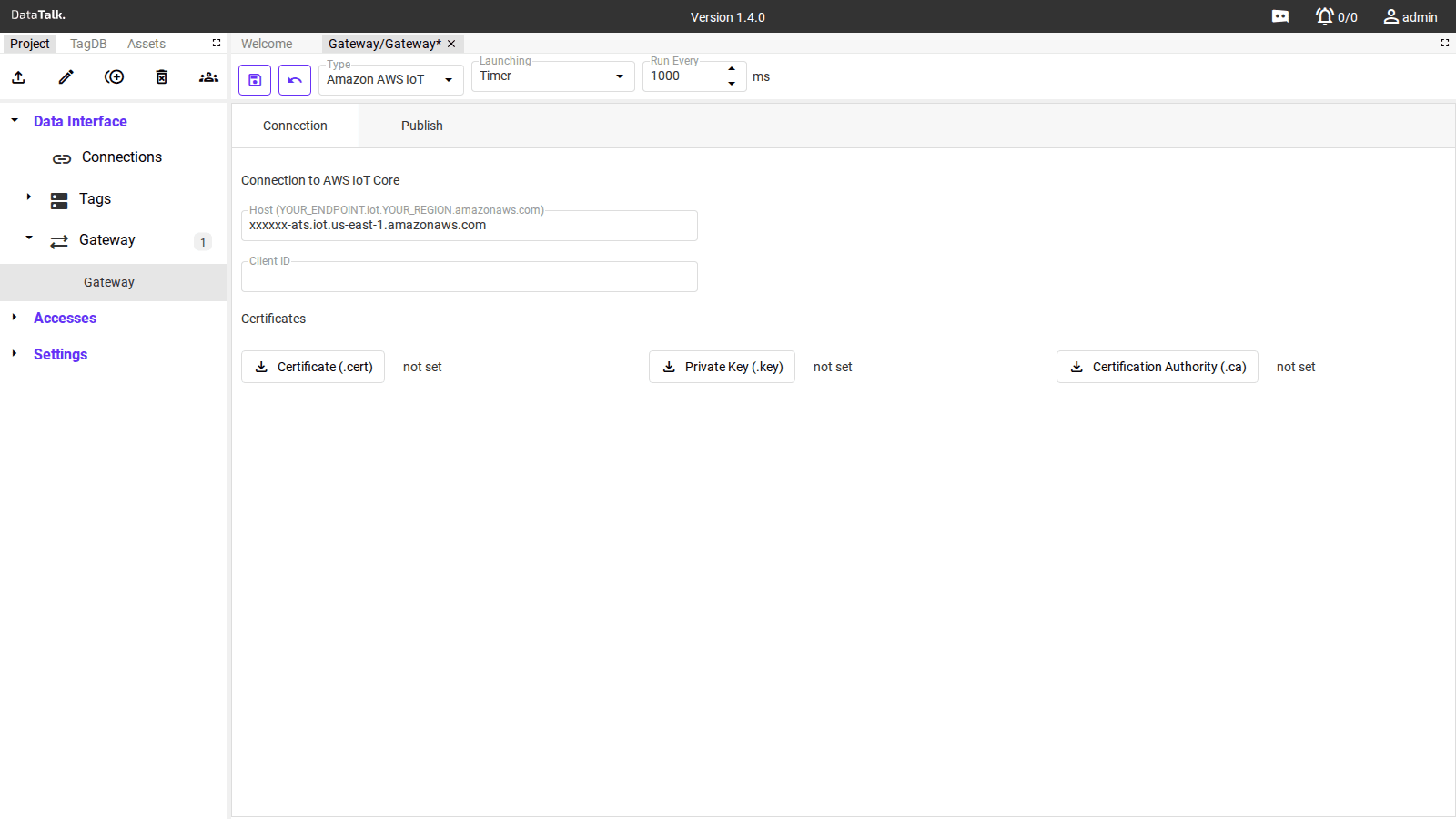
Forwards tag data to AWS IoT Core using MQTT over TLS with certificate-based device authentication — the standard AWS IoT connection model.
Connection tab fields:
Host — Your AWS IoT Core endpoint, in the format <prefix>-ats.iot.<region>.amazonaws.com. Find it in the AWS console under IoT Core → Settings → Device data endpoint.
Client ID — The Thing name registered in AWS IoT Core. Must match the name used when creating the certificate and policy in AWS.
Certificates — AWS IoT Core requires mutual TLS authentication. Upload three files:
- Certificate (.cert) — the device certificate issued by AWS IoT when you created the Thing
- Private Key (.key) — the private key paired with the device certificate; download it from AWS when creating the Thing (cannot be re-downloaded later)
- Certification Authority (.ca) — the Amazon Root CA certificate (download from the AWS IoT console)
Publish tab: Tag values are published as MQTT messages to topics in your AWS IoT Core namespace. From there, IoT Rules can route them to DynamoDB, S3, Lambda, Kinesis, or any other AWS service.
Database
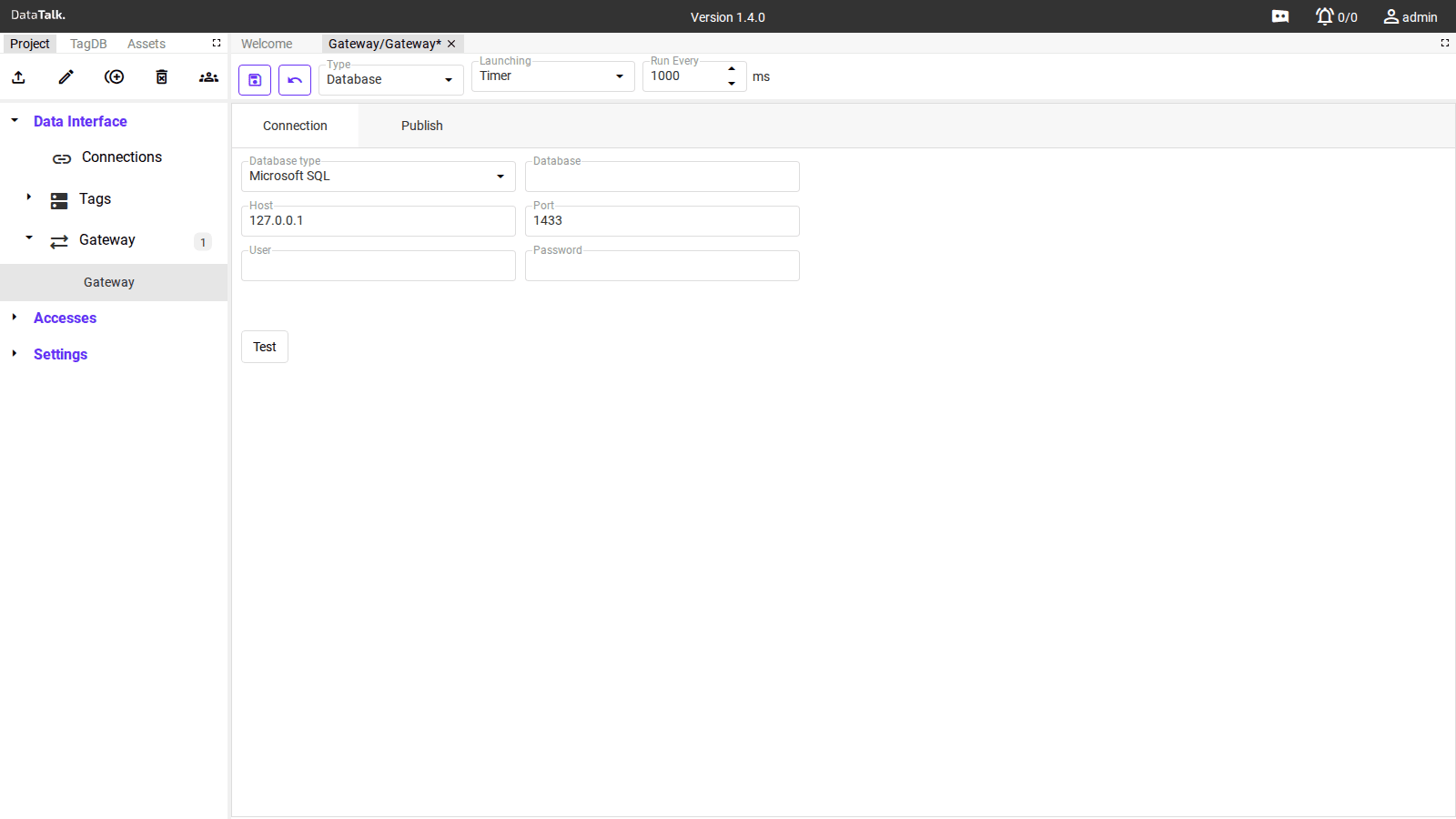
Writes tag values directly into a relational database table. Use this to integrate with existing enterprise systems — historians, ERP platforms, or custom reporting databases — that already have a database as their primary data store.
Connection tab fields:
Database type — The target database engine. Supported options include Microsoft SQL, and others depending on the DataTalk version.
Database — The name of the target database on the server.
Host — IP address or hostname of the database server.
Port — Database port. Defaults to the standard port for the selected engine (e.g., 1433 for Microsoft SQL Server).
User / Password — Database credentials with write access to the target table.
Test — Click to verify the connection before saving. Confirms the gateway can reach the server and authenticate successfully.
Publish tab: Maps tag values to columns in the target table and configures how records are written (insert, upsert, or update).
Rest API
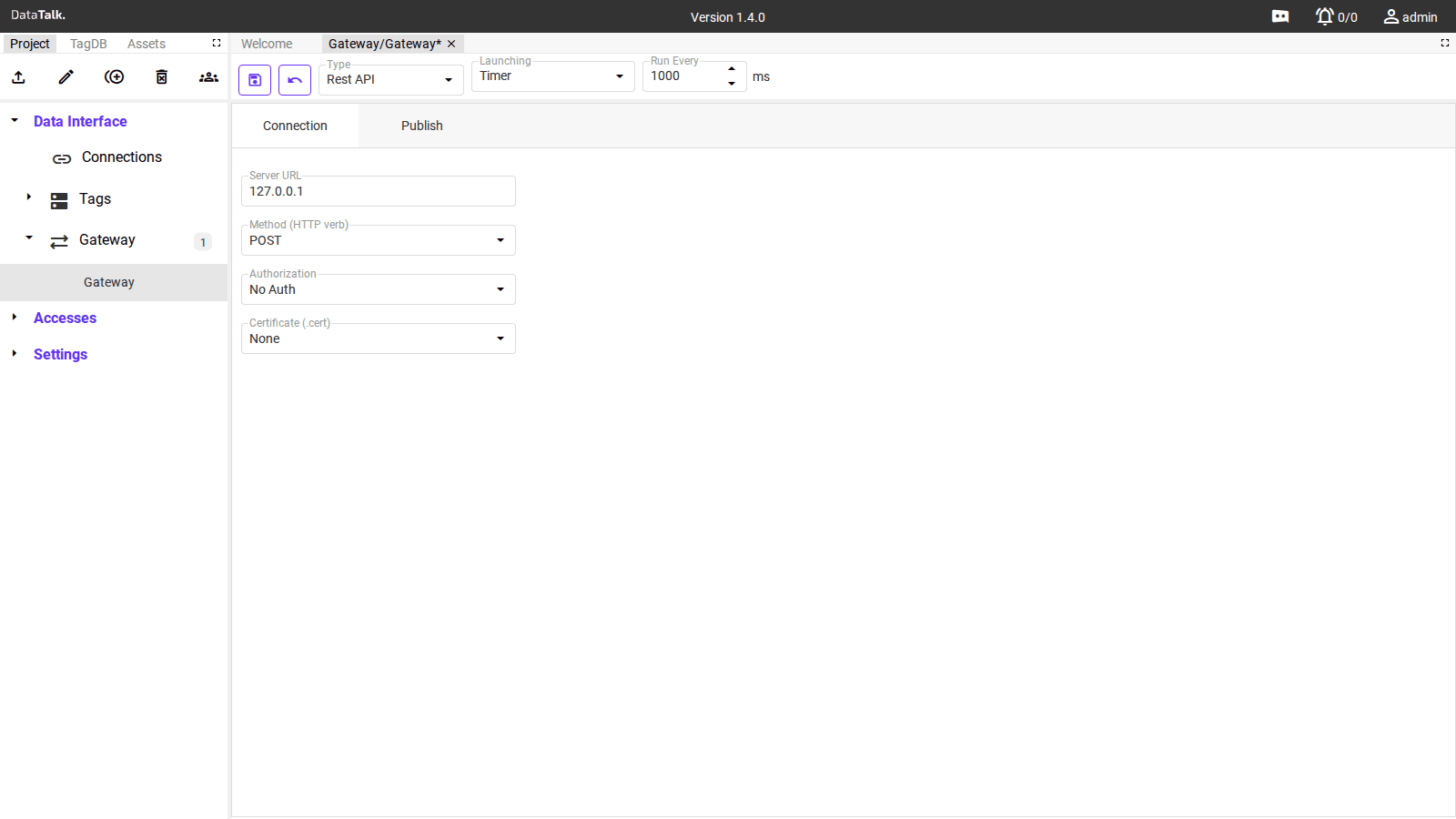
Sends tag data to any HTTP/HTTPS endpoint using standard REST conventions. Use this when the target system exposes a web API — cloud platforms, custom backends, third-party SaaS services, or any system that accepts HTTP requests.
Connection tab fields:
Server URL — Full URL of the target endpoint (e.g., https://api.example.com/telemetry).
Method (HTTP verb) — HTTP method to use. Default POST. Use PUT if the API uses replace semantics. GET is also available for APIs that accept data in query parameters.
Authorization — Authentication method:
- No Auth — no credentials sent; suitable for internal endpoints on trusted networks
- Other options (Bearer Token, Basic Auth) may appear depending on version
Certificate (.cert) — Optional client certificate for mutual TLS authentication against endpoints that require it.
Publish tab: Configure the request body payload — the format (JSON, form data) and which tag values are included in each request.
How Gateway relates to Data Servers
The Gateway and the Data Servers page both push data outward, but they serve different purposes:
Data Servers (MQTT Broker, OPC UA Server) make the gateway passively available — external systems connect to the gateway and pull or subscribe to data on their schedule.
Gateway makes the gateway actively push — the gateway initiates the connection, formats the payload, and delivers data to the target on its own timer or trigger. No client needs to connect; the data flows outbound automatically.
Use Data Servers when external systems need to pull or browse data on demand. Use Gateway when you need guaranteed delivery to a specific cloud endpoint or database on a schedule.
You can configure multiple Gateway instances to different targets at the same time — for example, forwarding the same tag data to both an Azure IoT Hub and a local database simultaneously. Each gateway runs independently.