
Data Servers
Enable the built-in MQTT Broker and OPC UA Server to publish live tag data to external systems over standard IT protocols — no additional middleware required.
On this page
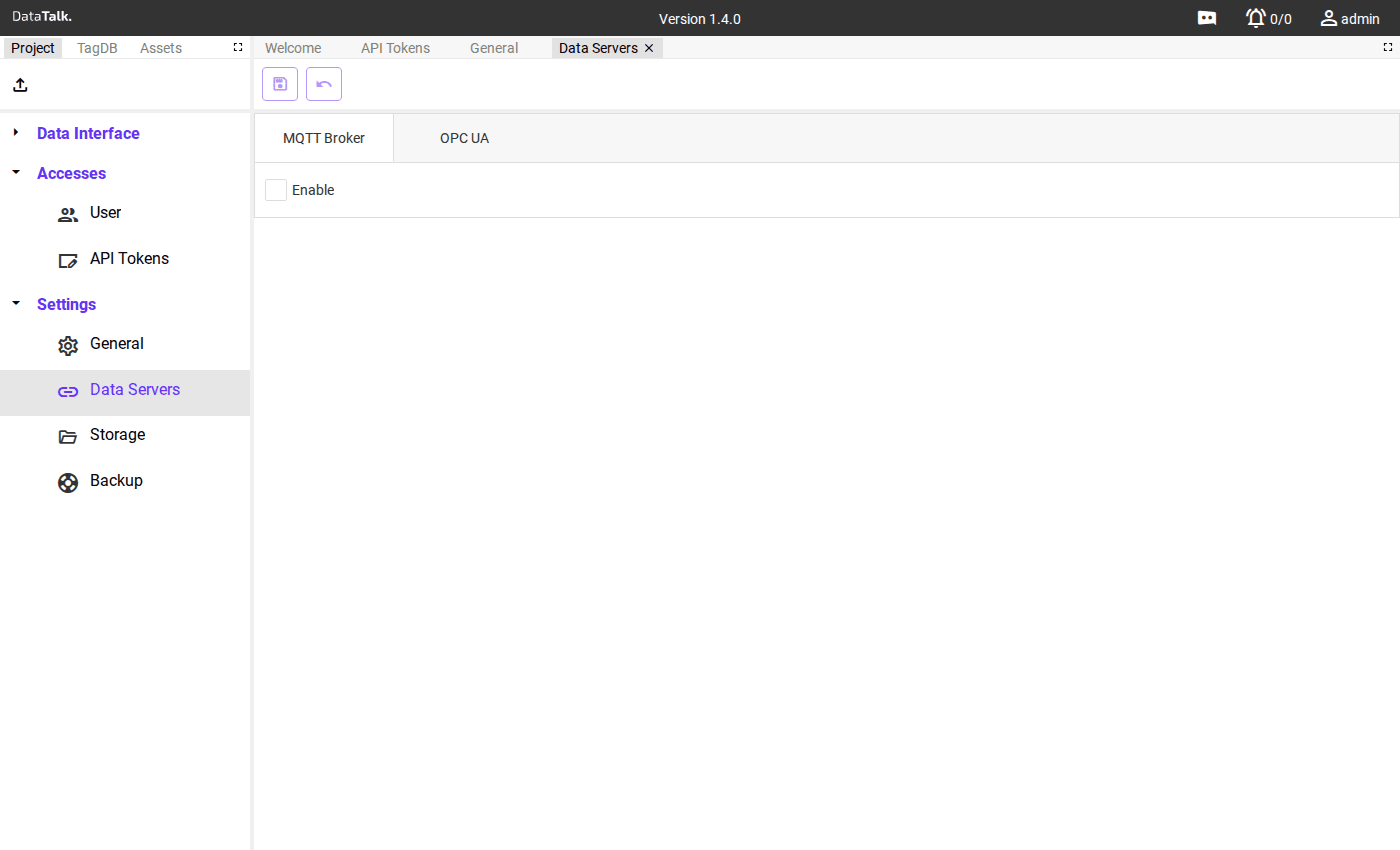
The Data Servers page controls the gateway’s outbound data publishing. Two protocols are available, each on its own tab: MQTT Broker and OPC UA Server. Enabling either one makes the gateway’s Tag Database accessible to any compatible external client.
MQTT Broker
The gateway includes a built-in MQTT broker — external systems connect to the gateway itself as MQTT clients. There is no need for a separate broker (such as Mosquitto or HiveMQ).
Check Enable to start the broker on port 1883 (standard MQTT). The gateway immediately begins publishing tag values as retained MQTT messages.
Access control
Three authentication modes are available — enable one or more depending on your security requirements:
Anonymous — any MQTT client on the network can connect and subscribe without providing credentials. This is the default and is convenient for closed industrial networks where device identity is controlled at the network level (firewall, VLAN). Disable this if the gateway is reachable from less-trusted segments.
Use User Name and Password — clients must supply a username and password when connecting. Use this when you need to restrict which systems can read tag data, for example when integrating with a cloud platform over the public internet.
Use Certificate — clients must present a valid TLS client certificate signed by a trusted CA. This provides the strongest identity assurance and is recommended for connections that cross network boundaries or that carry sensitive operational data. Both modes can be enabled simultaneously — clients can authenticate with either credentials or a certificate.
Connecting MQTT clients
Point any MQTT client to the gateway’s IP address on port 1883. Compatible systems include Node-RED, MQTT Explorer, AWS IoT Core, Azure IoT Hub, Grafana, and any application using standard MQTT client libraries (Paho, MQTT.js, etc.).
Topic structure
Tag values are published as retained messages. Subscribe to receive updates whenever a value changes:
datatalk/tags/<TagName>    # subscribe to one specific tag
datatalk/tags/# # subscribe to all tagsThere are two MQTT-related entries in the application. The MQTT Driver under Data Interface → Connections is an inbound connection — the gateway subscribes to an external broker to read data in. The MQTT Broker here under Settings is outbound — the gateway itself becomes a broker and publishes data out. They serve opposite directions.
OPC UA Server
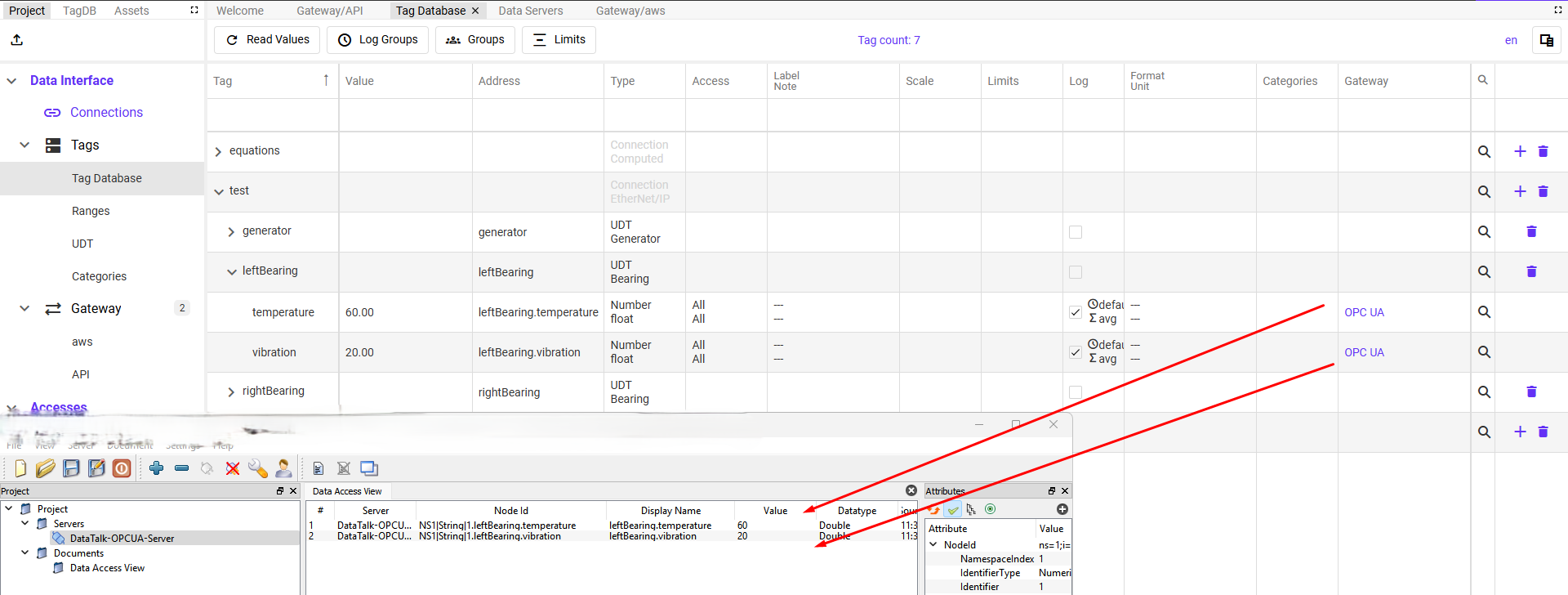
Use OPC UA when your SCADA system, historian, or industrial client needs to connect to the gateway using the industry-standard protocol — without any pre-configuration of tag addresses. Unlike MQTT, where the client must know topic names in advance, OPC UA clients can browse the gateway’s entire tag namespace and discover what is available before reading a single value. You do not need to know node IDs or tag paths ahead of time.
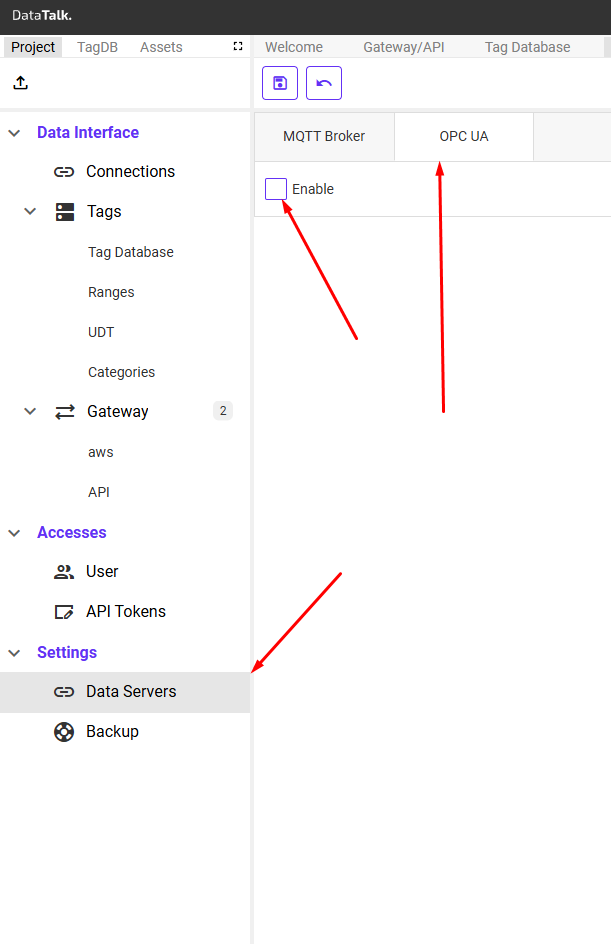
Check Enable to start an OPC UA server on port 4840 (standard OPC UA). The server exposes the entire Tag Database as a browseable OPC UA address space.
Unlike the Gateway types (MQTT, REST API, Azure, AWS), OPC UA does not require configuring a publish method or selecting tags manually. Once the OPC UA Server is enabled, tag values are automatically published whenever their value changes. Any OPC UA client that connects will immediately see the current values and receive live updates.
What OPC UA clients can do
Once connected, an OPC UA client can browse the full namespace to discover all available tags, read current values on demand, write to tags configured with RW access, subscribe to data change notifications (the server pushes updates, eliminating polling), and access historical data from the datalogs via the OPC UA Historical Access (HA) service.
Compatible clients include Ignition, Kepware KEPServerEX, Siemens WinCC, most industrial historian platforms, and any software implementing the OPC UA standard.
Access control
Two authentication modes are available:
Anonymous — any OPC UA client that can reach the gateway on port 4840 can connect and browse the tag namespace without credentials. Suitable for isolated control networks where access is restricted at the network perimeter. Disable this when the gateway is accessible from office or cloud environments.
Use User Name and Password — clients must authenticate with a DataTalk username and password before they can read or write any data. The credentials are those configured in Users. Use this when multiple external systems connect to the same gateway and you want per-system access control, or when the gateway is reachable from outside the control network.
If the gateway is accessible from outside the plant network — via VPN, port-forward, or cloud relay — disable Anonymous and require username/password authentication. An open OPC UA server exposes your entire Tag Database including any writable tags to anyone who can reach the port.
MQTT vs OPC UA — when to use which
Best for: MQTT suits cloud platforms, IoT systems, and event-driven architectures. OPC UA suits SCADA systems, historians, and industrial clients.
Discovery: MQTT clients must know topic names in advance. OPC UA clients can browse the gateway’s full address space and discover all tags without prior configuration.
Historical data: MQTT has no built-in historical data mechanism. OPC UA supports historical access via the OPC UA HA service.
Security: MQTT offers optional TLS on port 8883. OPC UA includes built-in certificate-based security as part of the standard.
Standard: MQTT is lightweight and widely adopted in IoT. OPC UA is comprehensive and dominant in industrial automation.
Enable both MQTT and OPC UA at the same time to serve different types of consumers from a single gateway — a cloud analytics platform over MQTT and a SCADA historian over OPC UA.