
View Scripts
Extend a view with JavaScript — read and write tags, listen for changes, open components, show dialogs and call services from the built-in script editor.
On this page
When a single command is not enough, a view can run a script. Scripts are useful for operations such as modifying several tags at once, performing calculations, executing conditional logic or implementing custom operator actions.
Script editor
Click Script in the toolbar of the View Editor. The editor area is replaced by a code editor; the View button in its top-left corner returns to the drawing.
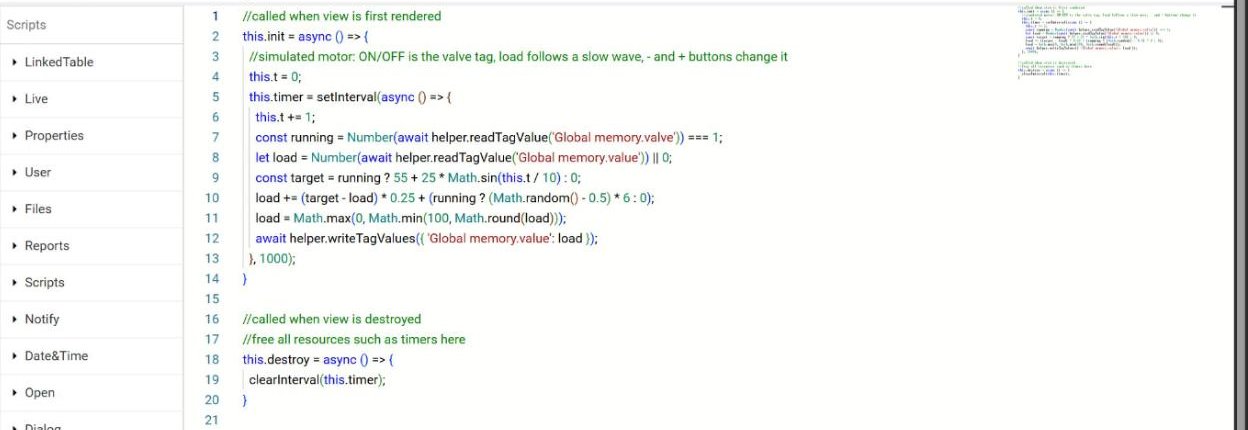
The editor has three parts:
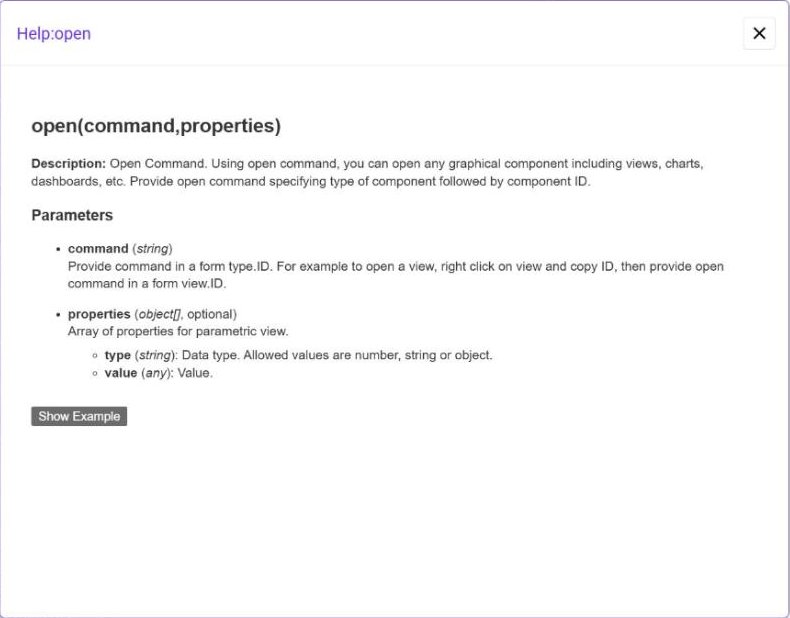
Function list (left) — every function that the view can call, grouped by category. Click a function to read its description in the Info box below the list. Show more… opens a help window with the parameters and an example.
Code editor (right) — a code editor with line numbers and an optional minimap. The Lines and Minimap check boxes in the top-right corner switch them on and off.
Info box — the description of the selected function.
Lifecycle template
A new script starts with two functions:
//called when view is first rendered
this.init = async () => {
  //you can start timer here
  //this.timer=setInterval(async ()=>{},1000);
}

//called when view is destroyed
//free all resources such as timers here
this.destroy = async () => {
  //clearInterval(this.timer);
}
this.init runs when the view is first rendered — start timers and listeners here. this.destroy runs when the view is closed — stop everything you started, so that timers do not keep running after the operator has left the screen.
Available functions
The functions are available on the helper object, for example helper.open(...) or helper.writeTagValues(...).
| Category | Functions |
|---|---|
| LinkedTable | getData — get data from a linked table. |
| Live | readTagValues, readTagValuesWithStatus, readTagValue — read tags; writeTagValues — write tags; listenForTags — call a function when tag values change; readLiveAlarms, listenForAlarms — read and watch active alarms. |
| Properties | getProperties — read the array of properties (parameters) passed into the view. |
| User | getUserName, getUserGroups — the logged-in user and the groups they belong to. |
| Files | readFileFromUserData, readBinaryFileFromUserData, readJsonFromUserData, writeFileIntoUserData — read and write files in the userData directory. |
| Reports | generateReport — generate a report. |
| Scripts | runScript — run a server-side script. |
| Notify | sendNotification — send a notification to a predefined group of services. |
| Date&Time | setDateRange, setLiveInterval — set the date range or the live interval for all components of the view that accept it. |
| Open | open, openParent, openComponent — open views, charts, dashboards and other components; replace what a component shows. |
| Dialog | open — popup dialog; closeDialog; alertDialog — message box; confirmDialog — returns true if the user accepts. |
| Elements | getId — get an element of the view by its ID. |
| History | Read the history of tag values and alarms, and tag statistics. |
| API | apiGET, apiPOST — call a remote server through a REST API. |
| Sound | playSound, stopSound — play a sound with a repeat count (or 0 for endless) and stop it. |
| AI | chatWithAI, searchUsingAI — ask the AI assistant, search documents with the AI agent. |
| Utilities | formatDate, formatNumber — format values according to a pattern. |
Examples
Write tags
writeTagValues writes several tags at once. Tags are given as key: value pairs, where the key is the tag name:
await helper.writeTagValues({ 'PLC1.tag1': 23, 'PLC2.tag2': 'String value', 'PLC1.tag3': [10, 20, 30] });Read a tag
readTagValue returns the current value of one tag. The tag name has the format connection.tagname:
let value = await helper.readTagValue('Global memory.value');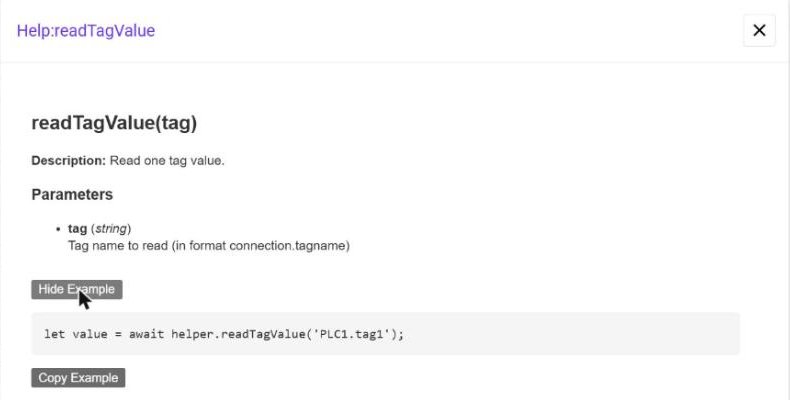
Read the view parameters
getProperties returns the parameters that the view was opened with. A parametric script builds the names of its tags from them:
const p = await helper.getProperties();
const loadTag = 'Global memory.' + (p[1]?.value ?? p[1] ?? 'value');   // parameter {2}
Simulate a machine
A script with a timer can play the role of a device while you design a view. The motor simulation from Tutorial — Reusable Motor Faceplate reads the load tag and the run tag from the parameters of the view, moves the load towards a target while the motor runs and writes it back every second:
const load = Number(await helper.readTagValue(loadTag)) || 0;
await helper.writeTagValues({ [loadTag]: Math.round(load + (target - load) * 0.25) });
The script reads the current load and moves it towards a target instead of overwriting it, so buttons that also change the tag keep working.
Open a view with a parameter
helper.open('view.viewID', [{ type: 'number', value: 3 }]);The viewID is the value copied with Copy ID from the Project tree.
Everything you start in this.init — timers created with setInterval, tag listeners — should be stopped in this.destroy.