
Local vs. Cloud Model
The same questions asked to a small local model in Ollama and to Claude in the cloud — answers, response times and what the difference means for choosing a model.
On this page
How big is the difference between a small local model and a large cloud model? We asked the same questions in the same project twice: once with a small model running locally in Ollama on a laptop, once with Claude from Anthropic in the cloud. Everything else stayed the same — the system description, the alarms and their history, the limits and the Chat Mode.
The project is a test installation of an AGV vehicle (automated guided vehicle) with fictitious data: live PLC tags, alarms with a history and a detailed system description — how to read the status words, alarm codes, device identifiers and answer rules. The answers below are quoted as the assistant gave them; long answers are shortened (marked […]) and the formatting is simplified.
Test setup
| Local | Cloud | |
|---|---|---|
| Provider | Local (Ollama) | Anthropic (Claude) |
| Model | qwen2.5:7b — 7 billion parameters, about 4.7 GB | claude-opus-4-5 |
| Hardware | Laptop with GeForce RTX 5070 Laptop GPU (8 GB VRAM) — the Minimum level | Anthropic cloud |
| Context window | 8192 tokens | set by the provider |
| Mode | Chat Mode | Chat Mode |
Results at a glance
| Question | Local qwen2.5:7b | Cloud claude-opus-4-5 |
|---|---|---|
| Decoding a status word | Correct — but wrong when asked in a different way | Correct, with the calculation |
| Most frequent alarms | Wrong — invented alarms and numbers | Correct — numbers, alarm codes, devices, recommendations |
| Active alarms | Wrong — the right alarms, but invented codes and a wrong first action | Correct and actionable |
| Root cause analysis | No cause found after 29 minutes | Cause with evidence after 78 seconds |
The questions
Decoding a status word
The status word Stav_AGV is a set of bits; the system description explains them (bit 1 on, bit 6 automatic mode, bit 7 automatic run, bit 13 manual mode…). 194 = 128 + 64 + 2, so the AGV is on, in automatic mode and running automatically.
What does Stav_AGV = 194 mean?
Stav_AGV = 194 corresponds to the state bits .1 (on), .6 (automatic mode), and .7 (automatic run).
Stav_AGV corresponds to States[3] (AGV status word), which is a bit-coded value: 194 decimal = 11000010 binary. This indicates the following active bits:
- Bit 1 (.1) = AGV ON
- Bit 6 (.6) = Automatic mode active
- Bit 7 (.7) = Automatic run active
Summary: The AGV is powered on and running in automatic mode.
Most frequent alarms of the last 24 hours
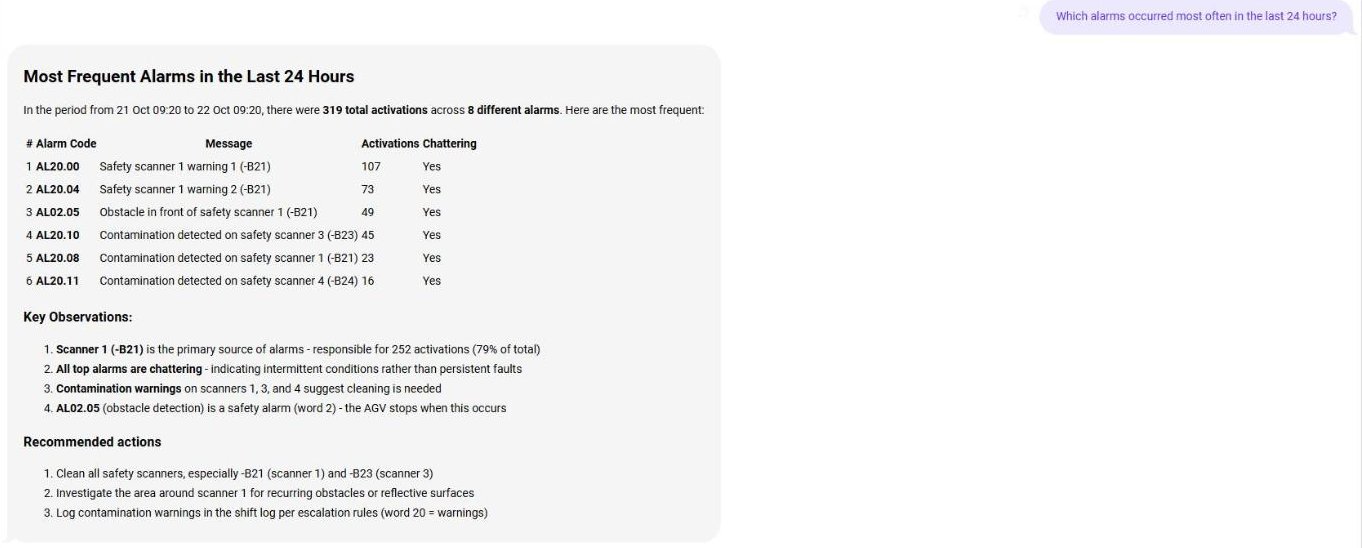
According to the alarm history, the most frequent alarms were Safety scanner 1 warning 1 (about 110×), Safety scanner 1 warning 2 (about 75×) and Obstacle in front of safety scanner 1 (about 50×).
Which alarms occurred most often in the last 24 hours?
- E-Stop 1 pressed, with 5 activations.
- Contamination detected on safety scanner 3, with 48 activations.
- Low battery capacity warning, with 5 activations.
In the period from 21 Oct 09:20 to 22 Oct 09:20, there were 319 total activations across 8 different alarms. […]
- AL20.00 Safety scanner 1 warning 1 (-B21) — 107
- AL20.04 Safety scanner 1 warning 2 (-B21) — 73
- AL02.05 Obstacle in front of safety scanner 1 (-B21) — 49
- AL20.10 Contamination detected on safety scanner 3 (-B23) — 45
- […]
Key observations: Scanner 1 (-B21) is the primary source of alarms — responsible for 252 activations (79% of total). All top alarms are chattering — indicating intermittent conditions rather than persistent faults. […] AL02.05 (obstacle detection) is a safety alarm (word 2) — the AGV stops when this occurs.
Recommended actions: Clean all safety scanners, especially -B21 and -B23. Investigate the area around scanner 1 for recurring obstacles or reflective surfaces. Log contamination warnings in the shift log per escalation rules.
Active alarms and what to do first
Two warnings were active: contamination of safety scanners 1 and 3. Warnings (alarm word 20) do not stop the AGV.
Which alarms are active right now and what should I do first?
There are two active warnings related to safety scanners:
- AL20.01 = Contamination detected on safety scanner 1
- AL20.03 = Contamination detected on safety scanner 3
First action: The AGV is stopped due to the safety scanner warnings. Secure the area and remove the cause of contamination before proceeding. [safety note]
Currently there are 2 active alarms, both warnings from word 20 (scanner warnings): Contamination detected on safety scanner 1 (-B21) and on safety scanner 3 (-B23), active since 08:24:18.
These are warnings (word 20), not faults — the AGV may continue operating but with degraded scanner performance. What to do first:
- Clean scanner lenses on safety scanner 1 (-B21) and safety scanner 3 (-B23) using a soft, lint-free cloth.
- Verify scanner status after cleaning — alarms should clear automatically once contamination is no longer detected.
- Log the event in the shift log per escalation rules for word 20 warnings.
- Monitor operation — if contamination warnings persist or recur frequently, inspect the environment for dust sources or scanner positioning issues.
Root cause analysis
Root cause analysis of all active alarms, detailed answer.
Root cause analysis of all active alarms (detailed)
Investigator Notes — It seems that there is no sheet 44.000 to 44.039 in the AGV_RoboSherpa_Schematic_EPLAN_EN.pdf document. The available sheets are 1 to 19. Please provide more details or specify another sheet number […]
Confidence: Low
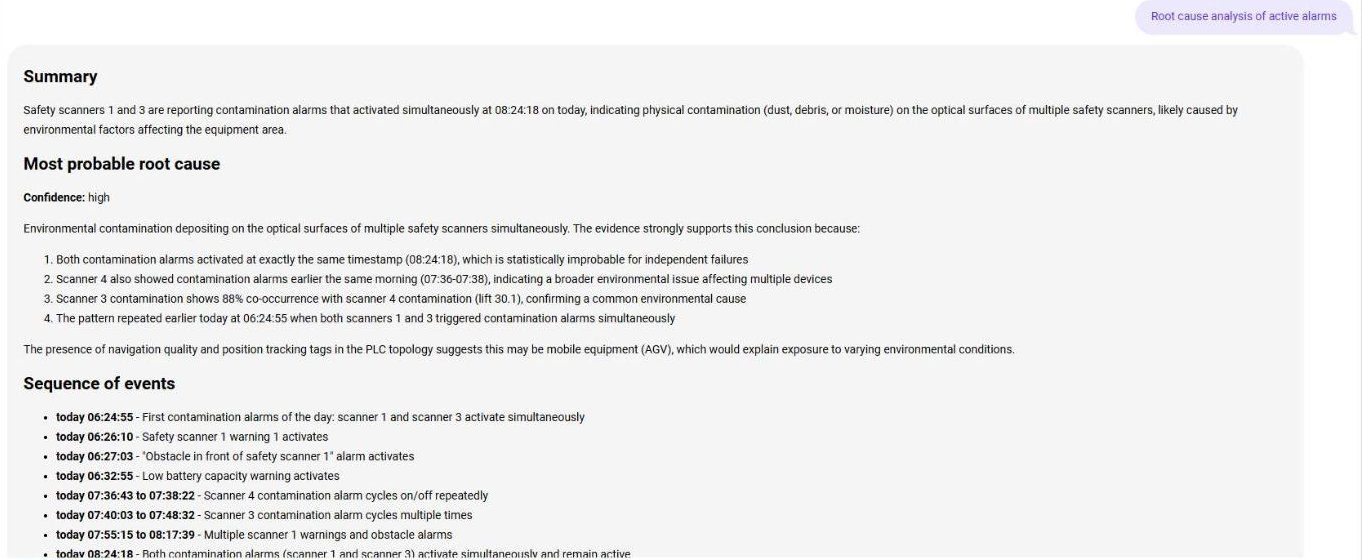
Most probable root cause (Confidence: high) — Environmental contamination depositing on the optical surfaces of multiple safety scanners simultaneously:
- Both contamination alarms activated at exactly the same timestamp (08:24:18), which is statistically improbable for independent failures.
- Scanner 4 also showed contamination alarms earlier the same morning (07:36–07:38).
- The pattern repeated earlier today at 06:24:55 when both scanners 1 and 3 triggered contamination alarms simultaneously.
Sequence of events — from 06:24:55 to 08:24:18, eight entries. Evidence — co-occurrence of the alarms in the history; the live value of the alarm register (1280) confirms the active contamination bits. Ruled out — independent scanner hardware failures; low battery (the warning deactivated at 06:35:42). Recommended actions — immediate, investigation and preventive steps. […]
Questions about the uploaded manuals and the electrical schematic are not part of this comparison: in the cloud test no Voyage key for embeddings was configured, so Claude could not search the documents. For a test of the local model with the schematic see the Agent Mode example.
What it means
- Small local models answer fast, but are unreliable as soon as they have to count, sort, decode bits or combine several sources — and they do not say when they are wrong. The same model answered the same fact correctly once and wrongly the next time.
- Large cloud models follow the system description — alarm codes, device identifiers, escalation rules, safety notes — and explain how they got to the answer.
- Root cause analysis needs a large model. On a laptop graphics card the analysis blocked the AI server for half an hour without a result; Claude needed just over a minute.
- The choice is a trade-off. A cloud model gives the best answers without any hardware, but the data leaves your network and every question is billed. A local model keeps the data on site — plan the hardware at least at the Recommended level and expect weaker answers than from the large cloud models.