
AI Conversations
Review the conversations of all users with the AI assistant — select a user, browse chats and searches, filter by rating and export to PDF.
AI Conversation gives an administrator an overview of how the assistant is used. Open it with the AI Conversation button in the top-right corner of AI Expert Settings. It opens in its own tab.
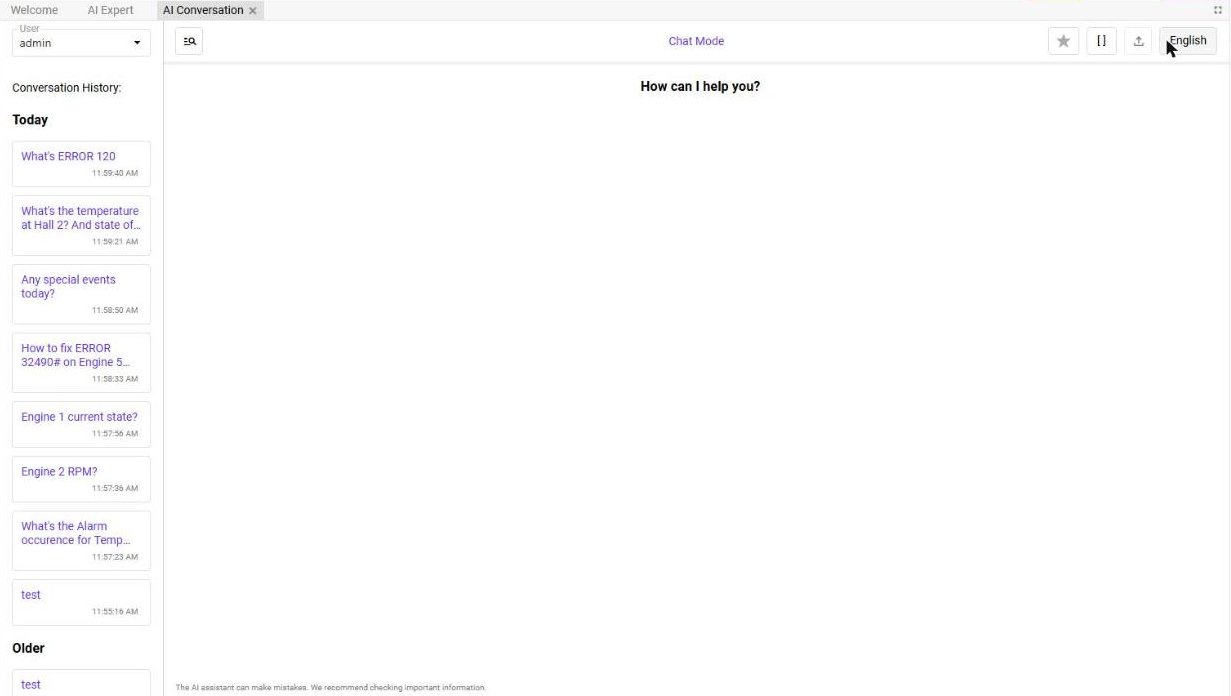
| Part | Function |
|---|---|
| User | Selects whose conversations are shown. |
| Conversation History | The conversations of the selected user, grouped into Today and Older. Click one to read it. |
| Search (magnifier) | Switches between Chat Mode (conversations) and Search Mode (searches in documents with their Search History). |
| Filter by number of stars | Shows only answers with a given rating — available when Enable AI reply rating is on. |
| [ ] | Hides supplementary text in square brackets. |
| Export | Exports the conversation to a PDF. |
| Language | The language of the view. |
Use the conversations to improve the assistant
Answers such as the provided context does not contain any information about… show what the assistant is missing. Add the information to the System Description, upload the relevant documents to Assets, or raise the limits in Advanced.