
Introduction
DataTalk AI Alarm & Notify reads live tag values from industrial devices — PLCs, sensors, and other field equipment — evaluates them against configured alarm thresholds, and immediately sends notifications through channels such as email, Telegram, or Slack when a limit is exceeded. An integrated AI assistant lets operators query alarms and tag values in plain language without leaving the interface.
Alarm monitoring
The alarm list is the heart of the application. Each row represents one alarm event and is color-coded by state:
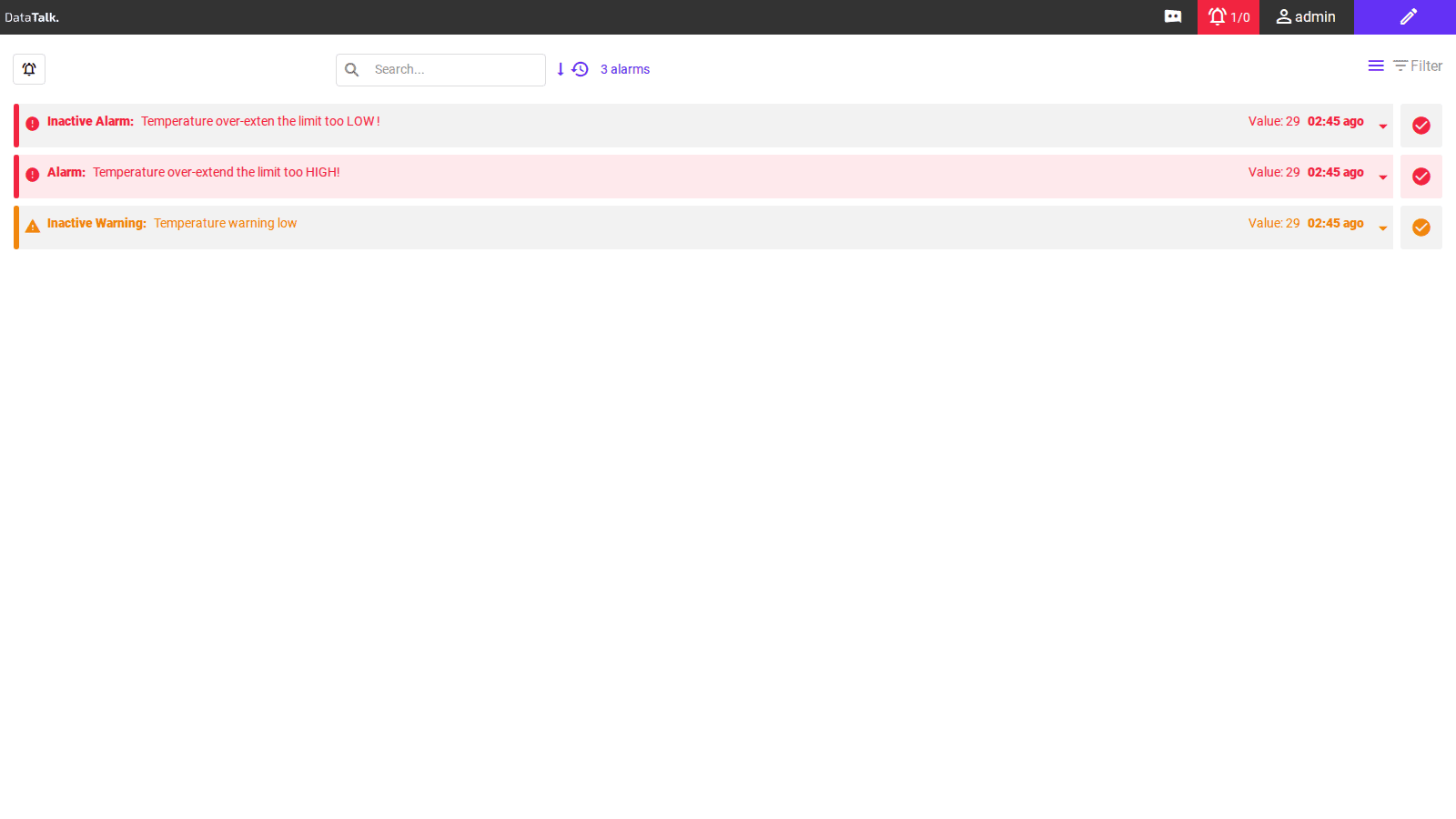
Alarm — red background with red left border. The tag value has crossed a threshold and the alarm has not been acknowledged.
Inactive Alarm — grey background with red left border. The alarm was triggered but the value has since returned below the threshold.
Inactive Warning — white background with yellow/orange left border. A warning-level threshold was crossed but is no longer active.
The alarm counter in the top bar (for example, 1/0) shows unacknowledged active alarms on the left and acknowledged active alarms on the right. The total number of alarms currently visible in the list (for example, “3 alarms”) appears above the list.
Configuration
All configuration — connections, tags, alarm limits, notification channels, users, and AI settings — lives in Edit Mode. Switch to Edit Mode by clicking the pencil icon at the top right of the top bar. Click the pencil icon again to return to View Mode.